My Hedgehog1.0.6
Publisher Description
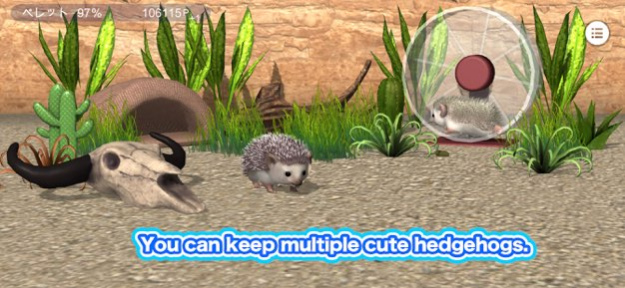


This app lets you raise hedgehogs, which are popular pets.
Hedgehogs come in a surprising number of colors, and in this app you can choose from six colors,
including standard, cinnamon, cinnamon, and the rare platinum, and you can raise up to two hedgehogs at a time.
Hedgehogs can be swapped with other hedgehogs as you like, and they will grow individually.
There are also a wide variety of layouts, including shelters, driftwood, plants, stones, flooring,
wallpaper, and a running wheel, which is essential for raising hedgehogs.
Please enjoy the sight of a hedgehog running desperately on its running wheel.
You can customize the layout to your liking, such as the position, angle, and color, to create your own unique layout.
Feed your hedgehog with crickets as a snack.
You'll be soothed by the sight of your hedgehog tilting its head to follow the tweezers.
Feed your hedgehog with pellets once every three days.
Take care of your hedgehog, earn points, and use them to shop.
Version History Fixed some minor bugs. 1.0.6 07/26/2024 Fixed some minor bugs. 1.0.5 07/25/2024 Fixed a bug that prevented wall color from being changed. 1.0.4 07/25/2024 Minor bug fixes. 1.0.3 07/21/2024 Fixed an issue where some shelters could not be placed. 1.0.2 06/24/2024 Minor bug fixes. 1.0.1 06/13/2024 1.0 06/13/2024
About My Hedgehog
The company that develops My Hedgehog is Yamabus. The latest version released by its developer is 1.0.6.
To install My Hedgehog on your iOS device, just click the green Continue To App button above to start the installation process. The app is listed on our website since 2026-10-07 and was downloaded 0 times. We have already checked if the download link is safe, however for your own protection we recommend that you scan the downloaded app with your antivirus. Your antivirus may detect the My Hedgehog as malware if the download link is broken.
How to install My Hedgehog on your iOS device:
- Click on the Continue To App button on our website. This will redirect you to the App Store.
- Once the My Hedgehog is shown in the iTunes listing of your iOS device, you can start its download and installation. Tap on the GET button to the right of the app to start downloading it.
- If you are not logged-in the iOS appstore app, you'll be prompted for your your Apple ID and/or password.
- After My Hedgehog is downloaded, you'll see an INSTALL button to the right. Tap on it to start the actual installation of the iOS app.
- Once installation is finished you can tap on the OPEN button to start it. Its icon will also be added to your device home screen.
Program Details
System requirements
Download information
Pricing
Version History
version 1.0.6
posted on 2026-10-07
Version History Fixed some minor bugs. 1.0.6 07/26/2024 Fixed some minor bugs. 1.0.5 07/25/2024 Fixed a bug that prevented wall color from being changed. 1.0.4 07/25/2024 Minor bug fixes. 1.0.3 07/21/2024 Fixed an issue where some shelters could not be placed. 1.0.2 06/24/2024 Minor bug fixes. 1.0.1 06/13/2024 1.0 06/13/2024
version 1.0.6
posted on 2024-07-26
Fixed some minor bugs.
